Category: announcement

  • Opening The BrassGate: Day One, A Hello, and a Helpful Plan

    Opening The BrassGate: Day One, A Hello, and a Helpful Plan

    I’m Cris. Today I shared a relaxed 45‑second welcome video across TikTok, X, and YouTube. No pitch — just who I am, why BrassGate exists, and an invitation to build something useful together.

    A gentle plan to warm up your audience

    This isn’t about hacks. It’s about showing up, helping, and earning trust a little each day. Here’s a simple structure you can copy.

    1) Define one person and one outcome

    • One person: Imagine a single client who’s overwhelmed and short on time.
    • One outcome: Reduce friction today — fewer clicks, fewer doubts, fewer steps.

    2) Set a sustainable cadence

    • Three posts a week to start. Enough to learn, light enough to sustain.
    • One format per day: Tip, Behind‑the‑Scenes, Question. Repeat weekly.

    3) Use repeatable formats

    • One Problem, One Fix: Name a common snag and give a single, clear step to move forward.
    • Show Your Work: A peek at a draft, a dashboard, or a checklist you actually use.
    • Office Hours Question: Ask one focused question your audience can answer in one line.

    Seven‑day warm‑up (no links, just help)

    1. Day 1 — Welcome: Who you are, what BrassGate stands for, and how you intend to help.
    2. Day 2 — Micro‑win: Share a 3‑step checklist that saves time on a common task.
    3. Day 3 — Behind the scenes: A screenshot or sketch with one lesson you just learned.
    4. Day 4 — Question: “What’s the smallest change that would remove friction from your week?”
    5. Day 5 — Problem → Fix: Name a typical obstacle and a single step to reduce it.
    6. Day 6 — Story in one paragraph: A client‑like scenario (no names) and how you’d approach it.
    7. Day 7 — Recap: The three tips people liked most, and what you’ll try next.

    Prompts you can copy

    • “If you’re juggling [task] and keep getting stuck at [step], try this one change: [action].”
    • “Today I learned [insight]. If you apply it, you’ll save about one decision per day.”
    • “What would make [process] feel 20% lighter this week?”
    • “Here’s the exact checklist I use for [repeatable task]. Steal it and adjust.”

    Engagement, but human

    • Reply by name and add one thoughtful question. Invite stories, not just emojis.
    • Pin your intro so new people understand your focus in seconds.
    • Close the loop: If someone tries a tip and reports back, surface their win (with permission).

    Lightweight hygiene

    • Bio clarity: Who you help and the core outcome you aim to deliver.
    • Consistent cover/thumbnail: Recognizable, simple, and readable on mobile.
    • Accessibility: Add captions to short videos and keep body text high‑contrast.

    How we’ll measure

    • Signals to watch: Replies, saves, and genuine questions.
    • Signals to ignore early: Follower spikes or impressions without conversation.
    • Learning loop: Each week, repeat what sparked replies; drop what didn’t.

    Boundaries that keep this sustainable

    • Time box: 30–45 minutes per posting day: 10 to write, 5 to post, 15–30 to engage.
    • No perfection pass: Helpful beats polished. Post, learn, refine.
    • Protect the mission: We’re here to help; anything that erodes trust doesn’t ship.

    Today’s ask

    Tell me what’s getting in your way right now. Name the snag in a sentence, and I’ll focus the next post on a practical fix. That’s the heart of BrassGate — care first, help next, learn together.

    If this feels useful, follow along and share what you need most. The gate is open.

  • When Craft Outpaces Reach… Reach Harder

    When Craft Outpaces Reach… Reach Harder

    Setup: a foggy doorway, a frank postmortem, and a new mandate

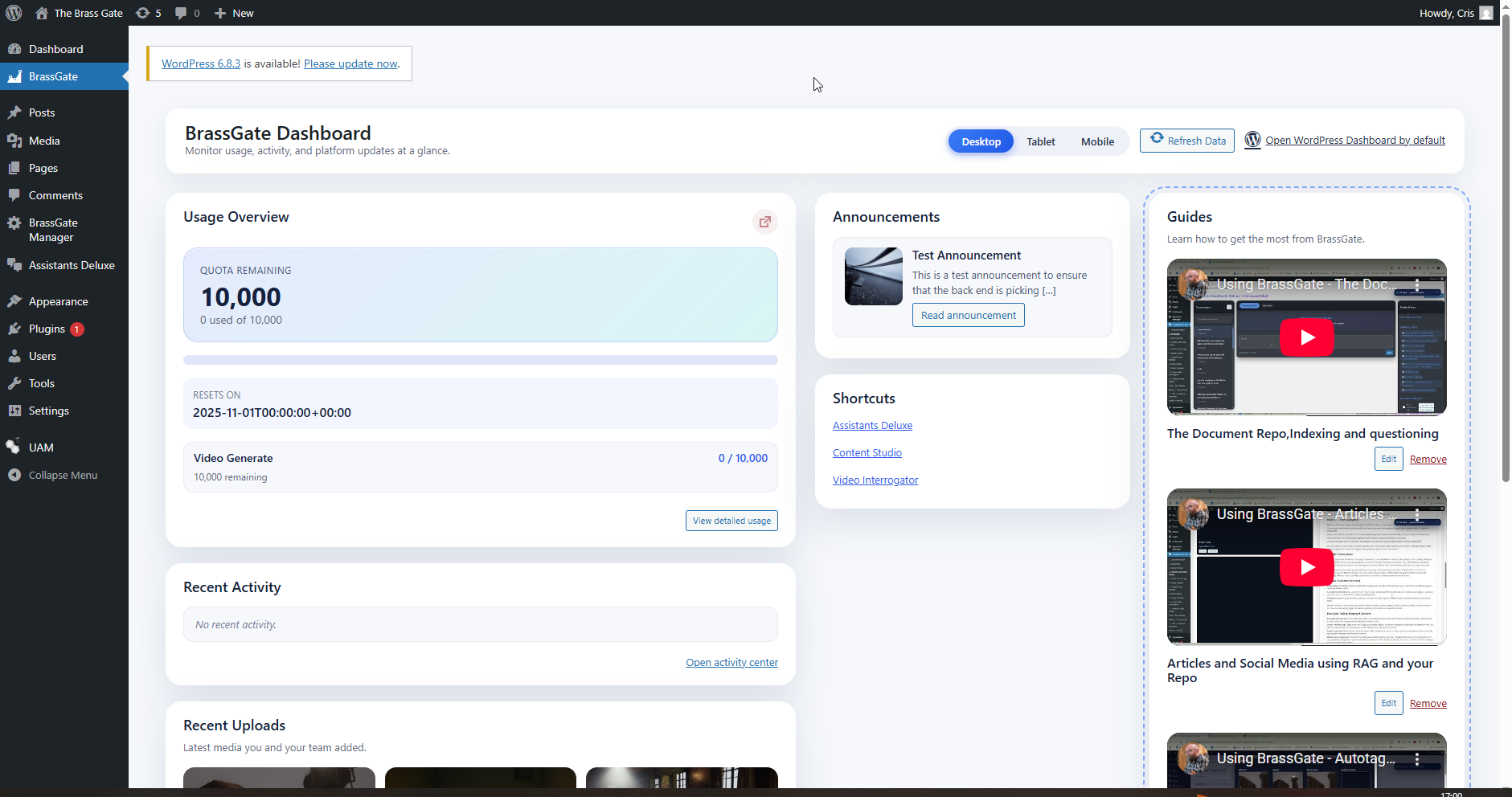
    The hero image—an ominous doorway in fog, statues standing guard—matches the headspace we were in after shipping The Wickie. The game earned quiet praise in small circles, but the numbers were blunt: fewer than 100 units sold by our accounting. It’s possible some factors were outside our control, yet the clearest lever we owned was marketing. We didn’t have the muscle memory, tooling, or cadence to meet players where they actually discover games.

    A sequel prototype (first called The Brass Gate) was on the table, but pushing forward without addressing the go-to-market gap felt like repeating a mistake. We paused game development and prioritized building BrassGate—a marketing system by a developer/artist for developers and artists.

    Challenges: when craft outpaces reach

    We faced three interconnected issues:

    • Timing: Announcements lagged production. By the time we had something cool, the channels had moved on.
    • Friction: Posting across platforms, resizing assets, and writing variants stole energy from development sprints.
    • Signal: Our materials were lore-rich but not structured for rapid comprehension by new players.

    There were also risks in over-correcting. We didn’t want to drown a moody, systemic game in loud, non-diegetic messaging. The image’s tone—mysterious, architectural, ominous—remained the north star.

    Process: building BrassGate and wiring it into development

    We spent roughly four months on a simple principle: marketing should feel like part of the build pipeline. The WordPress/BrassGate stack now generates articles and multi-platform variants with required assets attached, reducing handoffs and context switches. In practice, the system helps us stage content as we implement features, not weeks later.

    Some examples grounded in our docs and conversations:

    • Diegetic tutorialization, carried forward from The Wickie: in-world posters, comics, tannoy messages, and documents teach mechanics while enriching lore. The C.A.R.L. units (Cargo Allocation & Retrieval Laborers) will be introduced less like a pop-up and more like an encounter with a haunted machine—players learn protocols by inference and environment.
    • Marketing/ops alignment: content scaffolds exist for “Marketing the new asylum rock game,” ensuring captures, text variants, and alt assets can publish quickly without derailing a sprint.
    • QR-driven lore pages (exploratory): we’re testing how scannable codes might unlock web-based notes, art, or diegetic ephemera. We’re cautious about spoilers, accessibility, and privacy, so any rollout would follow baseline safeguards (HTTPS, input validation, expiring tokens) and be opt-in. If playtests suggest friction, we’ll pare it back.

    We designed around player agency early. Three complementary routes for a key opening segment of Asylum Rock—atmospheric exploration, combat + traversal, and puzzle/mystery—share assets and converge on the same gating. This supports different playstyles without multiplying production cost. Our notes track beats like ambient set tone, Dougie/Peter micro-prompts, conveyor blockade resolution, and a tannoy reveal—plus metrics such as document pickup rate, time to first hint, and combat TTK. Marketing artifacts are planned to mirror that structure: short clips for vertical movement, quiet fly-throughs for mood, and developer notes for puzzle chains.

    Lessons: what The Wickie clarified

    • Good isn’t enough without findability: We likely underinvested in awareness and consistency. The result was a gulf between craft and reach.
    • Diegesis can be a marketing asset: The same materials that teach can also market, if you shape them for discovery. A safety poster that encodes a switch order doubles as a social-friendly teaser.
    • Automate the boring things: Asset variants, platform formatting, and metadata should be mechanical. Human time is better spent on narrative, balance, and player empathy.
    • Measure early, not postmortem: Document pickup rates or puzzle completion times aren’t only design metrics—they suggest what to clip and explain in public updates.
    • Security is part of UX: If web-linked content exists (e.g., QR pages), players deserve secure, accessible experiences with clear privacy signaling.

    Process details: how we’re implementing

    • Content pipeline: WordPress/BrassGate templates generate long-form posts, executive variants, and image sets. This helps keep voice consistent and reduces last-mile bottlenecks.
    • Diegetic learning: For C.A.R.L. units, we prioritize environmental staging—binary broadcast lore, corrupted songs as breadcrumbs, facial recognition stasis, and crisis behaviors explained via in-world ephemera rather than pop-ups.
    • Route design: Route A emphasizes mood and slow discovery; Route B focuses on combat and verticality; Route C leans into inference and multi-step puzzles. Intersections and shortcuts let players shift styles mid-level. We log deaths, jump fails, hint usage, and completion times to tune difficulty.
    • Playable marketing: We’re exploring safe, opt-in QR “side channels” for expanded lore and behind-the-scenes context. If kept lightweight and respectful, this can build community without breaking immersion.

    Forward look: Asylum Rock with BrassGate in the loop

    Asylum Rock is the working title now anchoring our efforts. We’re cautious about dates and specifics until playtests confirm pacing and performance, but the direction is clear: a moody, systemic experience supported by a marketing system that respects player attention and developer time.

    BrassGate has matured into a SaaS with client separation and a bias toward privacy. We’re careful to avoid sweeping claims—teams vary, pipelines differ—but early use suggests that having content ops wired into development reduces the sense of marketing as a separate, draining job. For some studios, that alone may be the difference between shipping quietly and being discoverable.

    The foggy doorway in our hero image isn’t just a vibe; it’s a reminder to make the way forward visible. If our previous project taught us anything, it’s that you can’t rely on serendipity to guide players to your work. You have to light the path—subtly, consistently, and with care.

    If you’re a developer or artist who wants marketing to feel like a native part of your build, not a weekly scramble, BrassGate might be useful. We’re sharing what we learn as we go. If you’re curious—or skeptical—tell us what would make this genuinely helpful for your team.

    Explore approaches, see examples, and weigh whether BrassGate fits your pipeline at TheBrassGate.com.
  • The new BrassGate Dashboard 1.0

    The new BrassGate Dashboard 1.0

    The new BrassGate Dashboard: one calm center for clients and teams

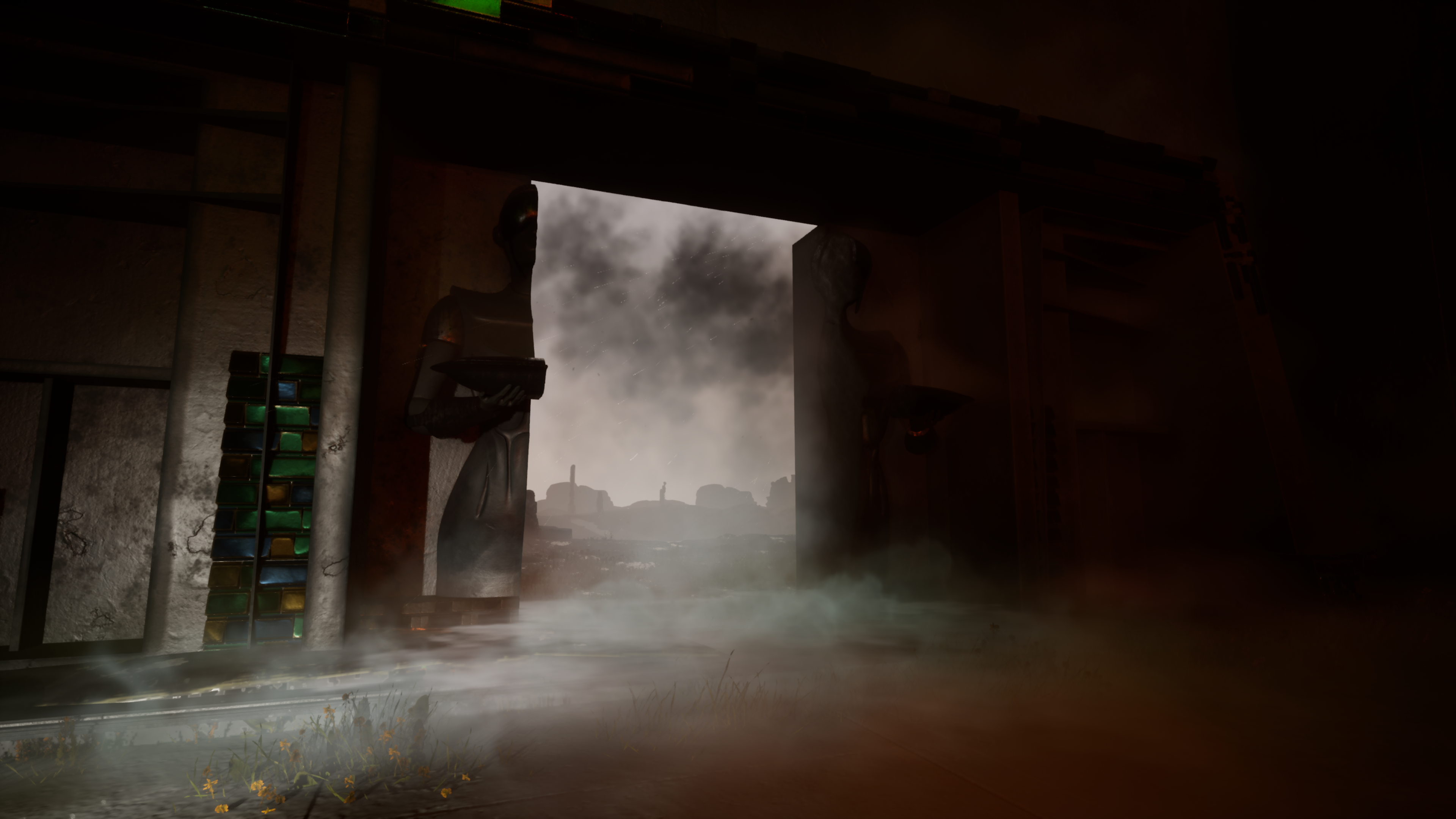
    Productivity often comes down to what you see first. Our new customer-facing dashboard is designed to greet you with clarity—so you can act with confidence. In the hero image, you’ll notice a purposeful arrangement: usage overview, announcements, guides, and shortcuts, framed by recent activity and uploads. It’s a simple idea with outsized impact: start in one place, find what matters, and move forward without friction.

    What changed

    Previously, the essentials were available but spread across menus and pages. The new dashboard gathers them into a single, steady home screen. From here, you can:

    • Scan quota and video-generation insights before you decide your next task.
    • See announcements when they’re timely—and only when they add value.
    • Open modules such as Settings, Plugins, Media, Posts, and Pages via clear shortcuts.
    • Catch up on recent activity and recent uploads without hunting through logs.
    • Spot new guides and lessons the moment you sign in.

    The goal isn’t novelty; it’s focus. By knitting together the surfaces you visit most, the dashboard reduces the mental overhead of getting oriented.

    Why it matters

    A clean, central starting point lessens context switching and helps teams maintain momentum. When quotas and generation limits are transparent up front, work planning becomes pragmatic rather than reactive. When guidance and articles appear precisely where they’re needed, onboarding shifts from ad hoc to continuous. And when shortcuts reflect the modules your team actually uses, day-to-day execution speeds up without the noise of an overgrown nav.

    For client teams, this means fewer status pings and faster time to meaningful work. For collaborators, it means consistent entry points that make coaching easier. For administrators, it means a place to set expectations and share changes without disrupting the creative rhythm.

    Implementation insights

    Rolling out the dashboard is less about toggles and more about shared habits. A few practical moves can make the experience feel immediately natural:

    • Make the dashboard the default landing page after sign-in, so everyone begins from the same context.
    • Curate shortcuts to match your workflow—keep what’s used daily (e.g., Media, Posts, Pages) and remove what adds noise.
    • Pin the most-requested how-to guides at the top of the guides panel; rotate in new lessons when they’re relevant to current projects.
    • Use announcements sparingly for real change notes (like policy shifts or feature rollouts) rather than routine reminders.
    • Agree on a cadence to review quota and video-generation trends—think of it as a quick standup in dashboard form.

    Small, predictable rituals—open the dashboard, scan usage, check updates, follow one guide—compound into faster, steadier delivery.

    Adoption patterns we recommend

    • First week: set expectations that the dashboard is the canonical starting point; add two or three role-specific guides so each person has a clear first step.
    • Second week: gather light feedback on what feels missing; adjust shortcuts and guide ordering accordingly.
    • Ongoing: treat announcements like a changelog—brief, useful, and archived for reference.

    Design choices you can feel

    The interface borrows familiar patterns from content platforms to minimize relearning: left-side access to core modules, a main canvas for activity and insights, and a supportive sidebar for guidance. Visual weight favors the usage overview and recent changes, not decoration. The result is a calm center—the right information, at the right depth, at the right time.

    What success looks like

    We encourage teams to observe qualitative signals: fewer orientation questions, quicker handoffs, and more consistent use of guides instead of one-off instructions. If you track internal metrics, look for steadier throughput and fewer surprises around quota utilization. The dashboard doesn’t replace good process; it spotlights it.

    Next steps

    1. Sign in and set the dashboard as your default opening view.
    2. Choose three shortcuts that will save your team the most clicks this week.
    3. Pin one guide per role—editor, contributor, approver—so help is always one tap away.
    4. Review your quota and video-generation panels at the start of each sprint to align scope with capacity.
    5. Tell us what should be surfaced next—this hub is designed to evolve with your workflow.

    The new BrassGate Dashboard was built to be a dependable launchpad, not a destination. Use it to reduce friction, turn insight into action, and keep your team moving with intention.

    Want help tailoring the dashboard to your organization’s flow? Share your use case, and we’ll help you make the most of it.

  • Test Announcement

    Test Announcement

    This is a test announcement to ensure that the back end is picking up correctly on announcements that are posted to the system. here is the changelog.

    Highlights

    • Dashboard usage card refreshed with quota status chips, upgrade CTA, and live reset hints sourced from the new /v3/dashboard/quota API.
    • Recent uploads module now streams from the activity feed and shows media type badges, timestamps, and actor context.
    • Announcements rail renders prioritized messages with dismiss state persistence, keeping critical notices above release notes.
    • Guides panel highlights onboarding checklists and deep links to tutorials, replacing the static placeholder copy.

    Added

    WordPress dashboard shell (brassgate/brassgate-dashboard.php) now enqueues dedicated JS/CSS bundles and wires REST endpoints with nonce headers.

    Backend dashboard routes (routes/v3/dashboard.py) expose quota snapshots and activity payloads for the refreshed widgets.